Who can introduce you? How Six Degrees ranks your way in
How Six Degrees ranks everyone two steps away, counts every way in, and finds the people only one of your connections can reach, with the formulas, and the invented sample network as the example.
5 min readBy Blake Burford
The question Six Degrees is built to answer is simple: who can introduce me? Not "who do I know", which a list of connections already tells you, but who your connections know, and which of them is the way to each person.
This post walks through how the app works that out: how it ranks the people two steps away, how it counts the ways in to each of them, and how it finds the people only one of your connections can reach. Every example comes from the sample network that ships with the app: 150 invented connections and the 598 invented people they know.
Two steps away
Your 1st degree is the people you know. Your 2nd degree is the people they know and you don't. Six Degrees gets the 2nd degree from circle scans: when it reads one of your connection's own connections, each person on that list becomes someone you can reach through them.
A person can turn up in more than one circle. In the sample, the 14 scanned circles hold 723 rows, but only 598 different people, because some people are known by two or three of your connections. That difference is the whole point of the next section.
Ways in
For each person two steps away, a way in is one of your connections whose scanned circle contains them. The app matches people by their profile address (ignoring any query or trailing slash), so the same person found in three circles counts once, with three ways in.
In the sample network:
503 of the 598 people have exactly one way in;
65 have two;
30 have three.
So 84% of the sample's 2nd degree hangs on a single connection each. Real networks vary, but the pattern is common: most of the people you can reach, you can reach one way.
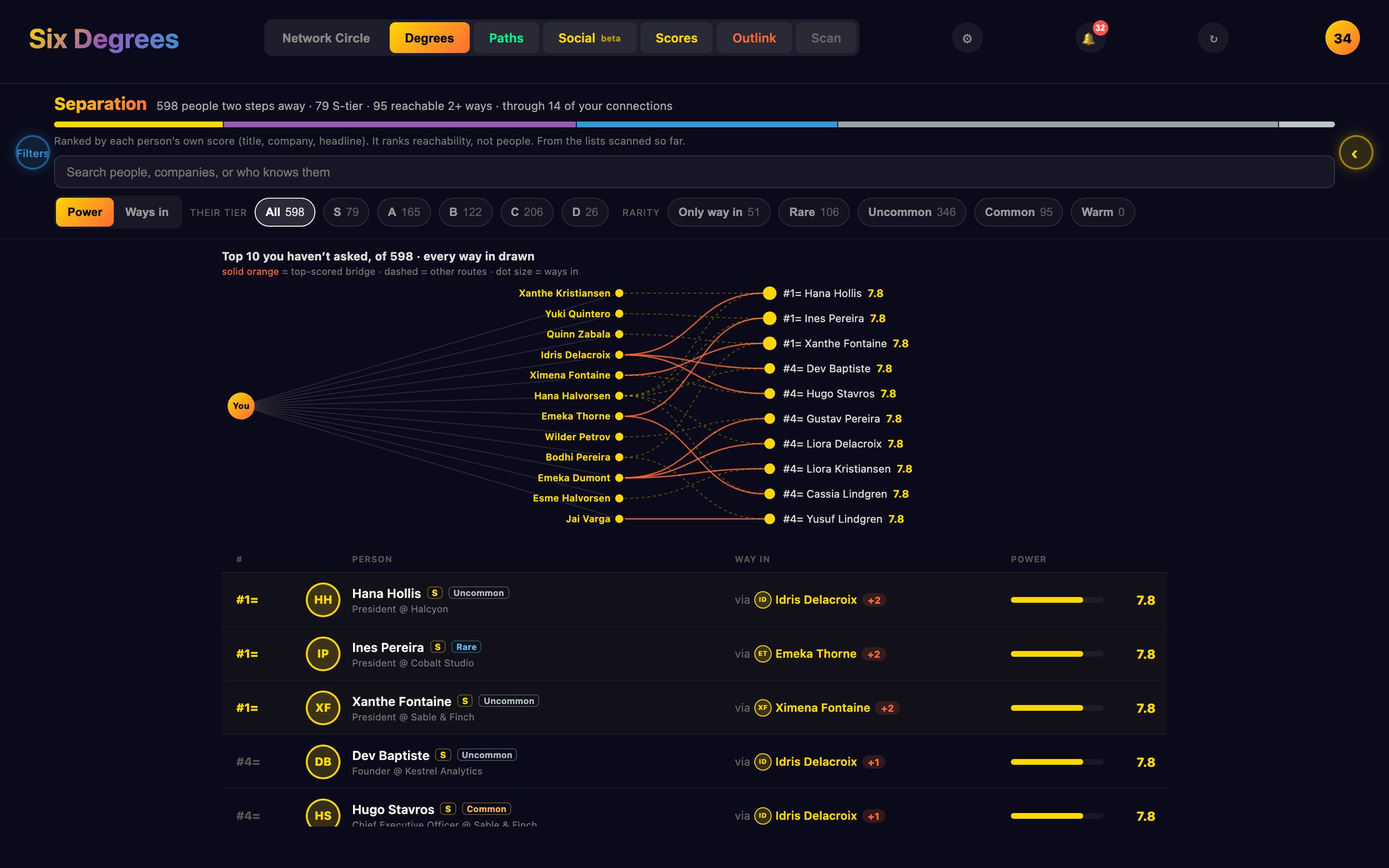
Separation: the ranked list
The Separation view in Degrees lists everyone two steps away. It ranks them by their own score first, the same power score every card shows (worked out from their title and their company), and then by how many ways in they have. Ties on both share a rank, shown as "#8=", so no one is ranked above someone identical by accident.
Each row says who can introduce you, and how many others could. A Ways in sort flips the order to "most ways in first", which is the list to work from when you want the warmest route rather than the most senior person.
Beside each person's tier sits their rarity: how many mutual connections lead to them. It uses LinkedIn's own mutual count when a scan saved one, and the number of ways in otherwise, in five bands: only way in (1), rare (2 to 3), uncommon (4 to 10), common (11 to 30) and warm (31 or more). Rarity never changes anyone's score; it just tells you how easy they are to reach.
Who only they can reach
Now turn it around. Instead of asking "how do I reach this person?", ask "what would I lose if I lost touch with this connection?"
For each of your connections with a scanned circle, Six Degrees counts:
total: everyone in their circle who isn't already your connection;
only: the people in their circle no other connection of yours reaches;
reach: their share of everyone, where a person with k ways in counts 1 ÷ k to each of those k connections.
In the sample, the connection with the largest exclusive reach is Bodhi Pereira, a managing director at an invented company called Northwind Labs. Their circle holds 69 people, and 51 of them, 74%, are reachable only through Bodhi. The card says it plainly: only through Bodhi. Show them opens Separation filtered to exactly those 51.
The reach number has a name in network research: it's ego betweenness (Everett and Borgatti, 2005). On a network shaped like this one, you in the middle, your connections around you and their circles beyond them, it gives the same answer as Brandes' betweenness centrality, in one pass over the data. The app ranks your connections by it: the rank on a card's Insights panel is by reach, not the plain "only" count.
Opening the same doors
Two connections can reach mostly the same people. A card shows which of your other connections overlaps theirs most, measured as the share of either circle that both reach (the Jaccard index: both ÷ (their total + the other's total − both)). It only says so when the overlap is real: 15% or more, and at least 3 people in common. "Opens the same doors as…" is a hint that one introduction may do the job of two.
Network health
The Scores tab puts it together for your whole network:
Reached two or more ways: of everyone you reach through a circle, the share with more than one way in. It's 1 minus (the sum of every connection's only, divided by the sum of every connection's reach). In the sample it's 16%. Higher is safer: lose touch with one connection and those people are still reachable.
Effective reach: Ronald Burt's effective size of your own network, N − 2t ÷ N, where N is your connections and t the ties between them that circle scans have kept. It discounts connections who all know each other. The sample has no ties between its connections, so its effective reach is simply its 150.
Your five connections who reach the most people no one else does, each with Explore to open their circle.
With fewer than five circles scanned, it says the numbers are an early estimate. And it never shows a percentile against other people: there's no one else's data to compare with, and that's by design.
What the numbers are not
A score in Six Degrees estimates network position, not what anyone is worth as a person. The model is open, in lib/scoring.js, and the brokerage counts are in lib/brokerage.js, with tests beside them. If a number looks wrong to you, the working is there to check.
The Galaxy is a force simulation. The physics lab hands you its controls: what each slider does, the Clusters preset, colour by, find, and a replay of your network by the day you connected that you can save as a video.
Six Degrees keeps your network in one folder on your own computer. What that means in practice, what the app contacts and when, and the protections that come with running on localhost.
How the optional Six Degrees scanner paces itself, the daily and monthly budgets it keeps to, why it stops at the first push-back, and what the risk to your LinkedIn account really is.
 Six Degrees
GitHub
Six Degrees
GitHub